


GIF Keyboard: What’s a Gif
4.122.00 Reviews
App Specs
- Version
- 3.0.2
- Updated On
- License
- Free
- Downloads
- 500,000+
- Developer
- OSmart Apps
- Categories
- Comics
- Platform
- Android
Screenshots

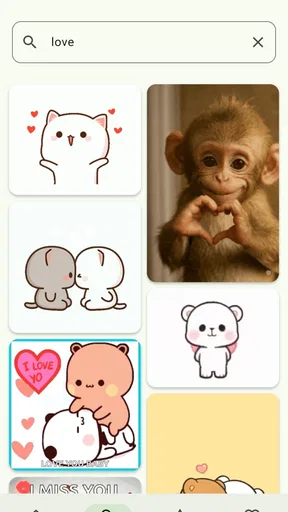
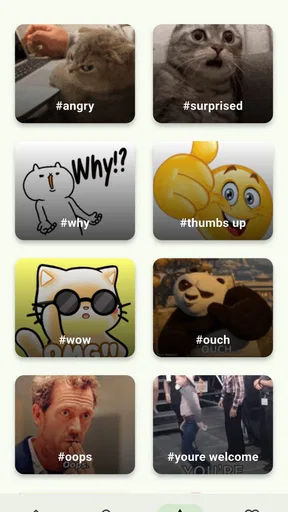


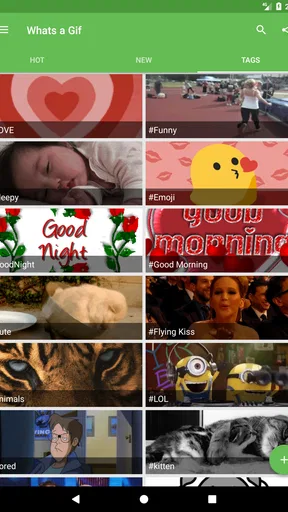
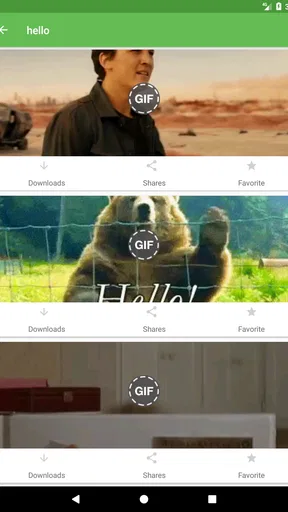
 Analysis by AppCompare
When I first tried GIF Keyboard: What’s a Gif, I treated it as a quick way to add a reaction to messages. It turned out to be more useful as a small visual-search tool built into everyday conversations. Instead of leaving a chat, searching for a funny image elsewhere, saving it, and returning to the message, I could look for a GIF, meme, or short visual response from the keyboard area and share it while the conversation was still moving.
That difference matters most on a shared phone or tablet in a household. One person may use it for family jokes, another for a group chat, and someone else for a quick reaction in a social conversation. The app is free, belongs to the Comics category, and comes from OSmart Apps. Its store summary focuses on finding, saving, sharing, and downloading funny memes, but my impression is that its real appeal is the reduced distance between discovering a reaction and sending it.
I would not describe it as a full comic-reading app or a general image editor. It is much narrower: a GIF keyboard with search at its center. If you want a huge creative toolbox, advanced editing, or a carefully organized personal media library, you may outgrow it. If you regularly think, “There must be a GIF for this,” it has a more convincing purpose.
How it fits into a shared household device
Imagine a family group chat where someone posts a photo of a badly assembled piece of furniture. One person answers with a laughing GIF, another sends a dramatic reaction, and the conversation continues. With this app available from the keyboard, the search-and-share process feels more natural than switching to a browser or a separate GIF catalog. That is the kind of everyday scenario where I found the app easiest to appreciate.
It also works for less obvious situations. A teenager might use a visual response instead of typing a long explanation, while an adult could use a simple celebratory animation in a work-related conversation. The same keyboard can serve different communication styles, but that flexibility also means the person using the device needs to choose the material carefully. Search results are not automatically the same thing as a family-friendly selection.
On a shared device, I would think of this as a tool that belongs to the conversation rather than to one person. It can help several household members communicate more playfully, but it does not replace basic coordination. If someone is about to send a GIF in a family thread, checking the image before tapping send is still worthwhile, especially when the search phrase is broad or slang-heavy.
The app’s audience size suggests that this is not an obscure experiment. It has passed half a million installs and holds an average rating of 4.1 from roughly three and a half thousand ratings. I see those figures as a sign of practical usefulness rather than proof that every household will enjoy it. A keyboard can be convenient for one person and distracting for another, depending on how often visual reactions are actually used.
Worth Reading Before You Choose

EA SPORTS FC Mobile 26 Is a Bigger Football Game, but It Takes Time

Flipboard Shows What News Apps Must Do Beyond the Feed

Switching to Android Auto Means Rethinking Your Driving Routine

Google Calendar Makes a Crowded Week Easier to Manage

Ludo King Makes the Most of the Minutes Between Plans

Baby Panda World Brings Quick Play to Modern Phones, but Its Game Library Feels Busy
What I noticed during setup
The first decision is whether you want a dedicated GIF keyboard available while typing. That is different from installing a normal image app and opening it only when needed. A keyboard sits close to your messages, so I recommend thinking about where it will be used before enabling it. On my own device, I would keep it for casual chats and use the ordinary keyboard when writing something sensitive, formal, or especially private.
This is not because the app should be treated as suspicious by default. It is simply good keyboard hygiene. A keyboard is part of the typing experience, and shared-device users should know which keyboard is active before entering passwords, personal notes, or confidential messages. The practical boundary is easy: use the GIF keyboard for finding and inserting visual content, then switch back when the conversation requires normal text or greater privacy awareness.
That boundary is particularly useful when several people borrow the same phone. A parent may install the app for family chats, while another household member may not want a GIF search panel appearing every time they type. Agreeing on when to use it prevents the keyboard from feeling like an interruption. I would also show less experienced users how to return to the regular keyboard, rather than assuming they will discover the switch on their own.
The store identifies the app as free, with in-app purchases priced at $0.99 per item. That makes trying it relatively straightforward, but a shared device introduces a separate question: who decides whether an optional item is worth buying? I would establish that before handing the phone to a child or letting several people use the same store account. The important point is not the small individual price; it is avoiding accidental or unplanned purchases through a device used by multiple people.
Search is convenient, but the wording matters
The most useful skill with this app is learning to search by the feeling of the response rather than by a complete sentence. If I search for a broad idea such as “happy,” I may get too many unrelated possibilities. A more specific phrase describing the mood or action usually gives me a better starting point. This is a small adjustment, but it saves time when a chat is moving quickly.
I also found that the first result is not automatically the best result. I prefer to pause for a moment and check the entire animation, not just the thumbnail. Some reactions make sense only after the motion finishes, and a GIF that looks harmless in a tiny preview can feel too intense or awkward once played. That quick check is especially important when a younger family member is choosing the response.
A useful household workflow is to search, preview, and then decide whether to share or save. Saving a reaction can be helpful when the same kind of joke appears repeatedly, but I would avoid turning every amusing discovery into a permanent collection. Otherwise, the keyboard becomes cluttered with one-off images that seemed funny for five seconds. The app is at its best when it helps me respond quickly, not when it becomes another media archive I have to manage.
Downloading and sharing serve different purposes. Sharing is the immediate action for a chat. Downloading makes more sense when I want to use an image outside the current conversation, although I would still think about where it is going and whether the context is appropriate. For household coordination, I would encourage people to share directly when possible instead of downloading everything to the device. That keeps the process clearer and reduces unnecessary copies in a shared photo area.
Coordinating conversations without taking them over
GIFs can make a family group chat warmer, but they can also make it harder to find important information. A stream of animated reactions may bury a reminder about an appointment, a shopping request, or a change to evening plans. My practical rule is to use the visual response after the useful information has been acknowledged, not instead of acknowledging it.
For example, if someone asks who is picking up groceries, I would answer that question in text first and add a GIF only if it helps the tone. A reaction alone can be funny, but it may leave the sender unsure whether the message was understood. This is where the app’s convenience needs a little discipline: it makes sending a playful response easy, but it cannot judge whether clarity or humor matters more in that moment.
In a household with different communication habits, it helps to agree that a GIF is not always an answer. One person may see it as friendly confirmation, while another may interpret it as avoiding the question. I like the app for celebrations, teasing between people who know each other well, and low-stakes reactions. I would be more cautious with disagreements, urgent plans, or messages that could be misunderstood without words.
There is also a useful coordination benefit when people share a device but not the same level of technical confidence. A simple search-and-share workflow can be easier to explain than moving between several apps. I would demonstrate one complete example: open the keyboard, search for a mood, preview the result, and send it. Once someone understands that sequence, they can usually adapt it to their own conversations without needing to learn a complicated editing system.
Age, trust, and choosing the right moments
The app carries a Teen content rating, which should shape how I introduce it in a household. That rating is not a guarantee that every search result will suit every child, and it is not a reason to assume the app is unsuitable for every adult. It is a reminder that GIF search is open-ended and that the person using it needs enough judgment to review what appears before sharing it.
For a teenager, I would focus on context rather than banning visual reactions altogether. We would discuss the difference between a joke sent to close friends and the same joke sent to a teacher, employer, or large group. A GIF can be forwarded, misunderstood, or detached from the original conversation. The app makes the content easy to find, so the trust decision belongs in the household conversation, not only in the installation step.
For younger children, I would be more careful about giving independent access. The keyboard format can make searching feel casual, but the content still comes from whatever the user asks for. I would prefer supervised use and clear expectations about checking images before sending them. I would not present the app as a child-focused communication tool; its Teen rating makes it better suited to older users who can understand audience and context.
Shared accounts add another layer. A person may search for something harmless in one conversation and leave the keyboard ready for the next user, who may assume the same context. I recommend treating the search box as a fresh action each time rather than relying on previous suggestions or recent discoveries. That habit is simple, and it helps prevent accidental sharing when several people use the same device.
The developer is OSmart Apps, and the current version is 3.0.2. The app has been available since December 11, 2016, so it is not a brand-new keyboard concept. That history makes it feel like a mature idea, but it also means I would keep expectations realistic: the experience is centered on GIF discovery and sharing, not on reinventing every part of mobile messaging.
Where it beats ordinary alternatives
The usual alternative is to search through a browser, copy an image, return to the chat, and hope the result fits the conversation. That method can work, but it breaks the rhythm of messaging. A separate GIF app may offer a larger browsing experience, yet it still asks me to leave the conversation. This keyboard’s strongest advantage is the short path from typing to visual response.
Compared with a standard emoji panel, it offers more expressive possibilities. An emoji is quick and predictable, while a GIF can communicate timing, exaggeration, or a recognizable reaction. That extra range is useful when a single symbol feels too flat. The trade-off is that GIFs are heavier in attention: they move, occupy more visual space, and can become annoying in a busy group chat.
Compared with a full meme editor, this app is faster but less deliberate. I would choose an editor when I need to add custom text, combine images, or create something specific for a recurring household joke. I would choose this keyboard when the goal is simply to find a fitting reaction before the subject changes. The right choice depends on whether speed or control matters more.
There is also a difference between personal messaging and public posting. For a private family exchange, an informal reaction may be perfect. For a public account, a school-related message, or a professional conversation, I would usually prefer a carefully chosen still image or plain text. The app does not make those decisions for me, and that is one of its limitations: the convenience is high, but the responsibility for tone remains with the sender.
Small frictions that affect everyday use
The keyboard approach can feel intrusive if I do not use GIFs often. It adds another place to look when I am already switching between letters, emoji, and other input options. Someone who sends mostly text may find that the extra panel offers little value. In that case, a browser bookmark or a separate media app may be less distracting.
Search quality also depends on how precisely I describe what I want. A vague search can lead to browsing rather than finding, which removes some of the speed advantage. I would not install this expecting a perfect answer to every unusual reference. It is most effective for recognizable moods, reactions, and common conversational moments.
Animated content is not ideal in every environment. On a slow connection or an older device, waiting for visual media can feel less immediate than sending text or an emoji. I would also avoid relying on GIFs when someone may have limited data, is reading in a quiet public place, or needs information that can be understood instantly. These are not reasons to reject the app, but they are good reasons to keep another way of replying available.
Purchases are another point where shared use requires attention. Because optional items cost $0.99 each, I would not let a child explore purchase prompts without an adult agreeing first. The app remains free to try, but “free” does not mean every optional part should be treated as automatically approved on a family device.
My household verdict
After using it as a practical reaction tool rather than a novelty, I see a clear audience. This is a good choice for households that enjoy visual conversation but still want a quick, keyboard-level workflow. It is especially useful for older children, teenagers, and adults who already share GIFs in group chats and would rather not leave the messaging app every time.
I would skip it for a family looking for strong child-oriented boundaries, a private photo organizer, or a complete meme-creation studio. The Teen rating means I would introduce it with guidance, not hand it over as an unrestricted children’s utility. I would also skip it if most household messages are practical instructions, because a normal keyboard may be faster and clearer.
For everyone else, my recommendation is to set simple rules: preview before sending, answer important questions with words, and agree who may use optional purchases on the shared device. Those habits solve most of the real friction I encountered. The app then becomes a light layer of personality rather than a source of confusion.
With a 4.1 average and more than half a million installs, it has enough real-world use to justify trying, especially since the basic app is free. I would not call it essential, but I would keep it available for the moments when an ordinary reply feels too dry. Used with a little awareness of age, audience, and shared-device boundaries, GIF Keyboard: What’s a Gif is a convenient, focused addition to casual messaging rather than an app that needs to dominate it.
Pros
- Large GIF library with reactions for almost any conversation.
- Search makes it easy to find GIFs by mood
- topic
- or phrase.
- Keyboard access lets you share GIFs without leaving most chat apps.
- Includes stickers and emojis for more expressive messages.
- Simple interface that is quick to learn and use.
Cons
- Some GIFs may be repetitive
- outdated
- or poorly matched to searches.
- The keyboard may require extra permissions to work across apps.
- GIF previews and sharing can use noticeable mobile data.
- Ads or promoted content may interrupt the browsing experience.
- Availability and features can vary between Android and iOS versions.
FAQs for GIF Keyboard: What’s a Gif
What is GIF Keyboard: What’s a Gif, and how does it work?
GIF Keyboard: What’s a Gif is a keyboard and GIF-search app designed to help you find and share animated images while chatting. After installation and setup, you can browse trending GIFs, search by keywords or emotions, and insert a selected animation directly into compatible messaging and social apps. Its main purpose is to make conversations more expressive without switching repeatedly between apps.
Is GIF Keyboard: What’s a Gif free to download and use?
The app can generally be downloaded at no initial cost, although availability of features may depend on the version installed and the platform you use. Some editions may include advertising, optional purchases, or premium content. Before downloading, check the current App Store or Google Play listing for pricing, subscription details, and any limitations, since these conditions can change with updates.
How do I enable GIF Keyboard: What’s a Gif on my phone?
After installing the application, you normally need to enable its keyboard through your device’s keyboard or language settings and then select it while typing. The exact steps differ between Android and iOS, so the app may provide an on-screen guide during setup. If the keyboard does not appear immediately, restarting the messaging app or reviewing the active keyboard list can help.
Does GIF Keyboard: What’s a Gif work with all messaging and social media apps?
The keyboard is intended to work with many popular messaging, email, and social networking applications, but compatibility is not identical everywhere. Some apps allow GIFs to be inserted directly, while others may require copying a link, pasting an image, or using the system share menu. Results can also vary according to your phone model, operating system, and the receiving app’s media support.
Is it safe to use GIF Keyboard: What’s a Gif, and what permissions does it require?
Because it functions as a third-party keyboard, you should review the permissions and privacy information carefully before enabling it. Keyboard apps can potentially process text entered through them, so avoid granting access unless you understand how the developer handles data. Download the app only from an official store, read recent privacy disclosures, and disable the keyboard whenever you are not comfortable using it.


